How to Use QR Codes in Email Marketing to Enhance Interaction with Your Subscribers
 Pablo Díaz · 07 May, 2026 · Email Marketing · 7 min
In recent years, QR codes have transitioned from being an almost anecdotal resource to becoming a daily tool for connecting the physical world with the digital. We see them in restaurants, stores, posters, or packaging, but… have you considered that they can play a key role in your emails?
In this article, you’ll discover how to integrate QR codes into your email marketing campaigns to increase interaction, improve user experience, and lead your subscribers exactly where you want: a registration page, an offer, an app download, or any action that boosts your business.
Additionally, I’ll show you best practices, mistakes to avoid, and how to generate your own QR codes for free in just minutes.
Why Are QR Codes Revolutionizing Email Marketing?
QR codes act as a bridge between your newsletter and the rest of your digital channels. Instead of relying solely on links within the email, the QR offers a visual and instant way to access additional content. Just point the mobile camera to open a website, watch a video, or download an app.
In a context where users’ attention is increasingly limited, offering such a direct action can make a difference.
Moreover, QR codes can be customized and their performance measured. If you use dynamic codes, you can edit the destination link after sending and analyze statistics such as the number of scans, location, or the device used.
That’s why more and more brands are incorporating them into their emails as a way to connect with their audiences outside the inbox and offer more interactive experiences.
Most Effective Uses of QR Codes in Your Campaigns
QR codes are versatile and can adapt to multiple objectives within an email marketing strategy.
Here are some of the most common (and effective) uses:
- Promotions and Discounts: include a QR that leads directly to a landing page or a digital coupon.
- Events and webinars: link the QR to the registration page or ticket download.
- Resource Downloads: guides, ebooks, or apps can be quickly distributed via a scannable code.
- Surveys or Forms: save steps and improve participation by directing the user directly to the form from the email.
- Omnichannel Connection: use a QR to lead the user to your physical store, a social profile, or even a personalized video.
The real value lies in simplifying the user journey: the less friction there is between interest and action, the more conversions you’ll get.
Best Design and Placement Practices in Email
It’s not just about “adding a QR and that’s it.” Effectiveness depends on how you integrate it into your design and the context in which the user will receive the message.
First, take care of the appearance of the code. You can customize the colors, add your logo, or use a frame with a call to action (“Scan to get your discount”). This reinforces your visual identity and encourages the reader to interact.
👉 Then we’ll see how you can generate it easily with a free tool.
Regarding size, ensure it’s legible but without breaking the design harmony. A QR that’s too small may be illegible, and one that’s too large may distract from the main message.
Where to Place It?
The best place for a QR is usually at the end of the email or near the main CTA, in a visible but non-invasive area.
You can also try including it in your signature header if it’s part of a continuous strategy (for example, to direct to your catalog or WhatsApp channel).
⚠️ Important Warning
It doesn’t always make sense to include a QR code in an email.
If most of your subscribers open your emails from their mobile, they won’t be able to scan the code with the same device. In those cases, the QR can serve as a visual reinforcement, but make sure to also add a clickable link to the same destination. This way, you avoid frustrations and maintain usability.
The principle is simple: the QR should facilitate the action, not complicate it.
Let’s look at some examples of how brands integrate QR into their campaigns.
Real Examples of QR Code Use in Email Marketing
QR codes can be applied in a multitude of contexts, from real estate to retail or app development.
Below are three examples illustrating how different businesses are using QR in their email marketing campaigns to increase interaction and facilitate specific actions.
1. More Attendees at a Real Estate Event
Real estate agencies often rely on open houses or presentation events to attract buyers. In this context, QR codes are a great ally.
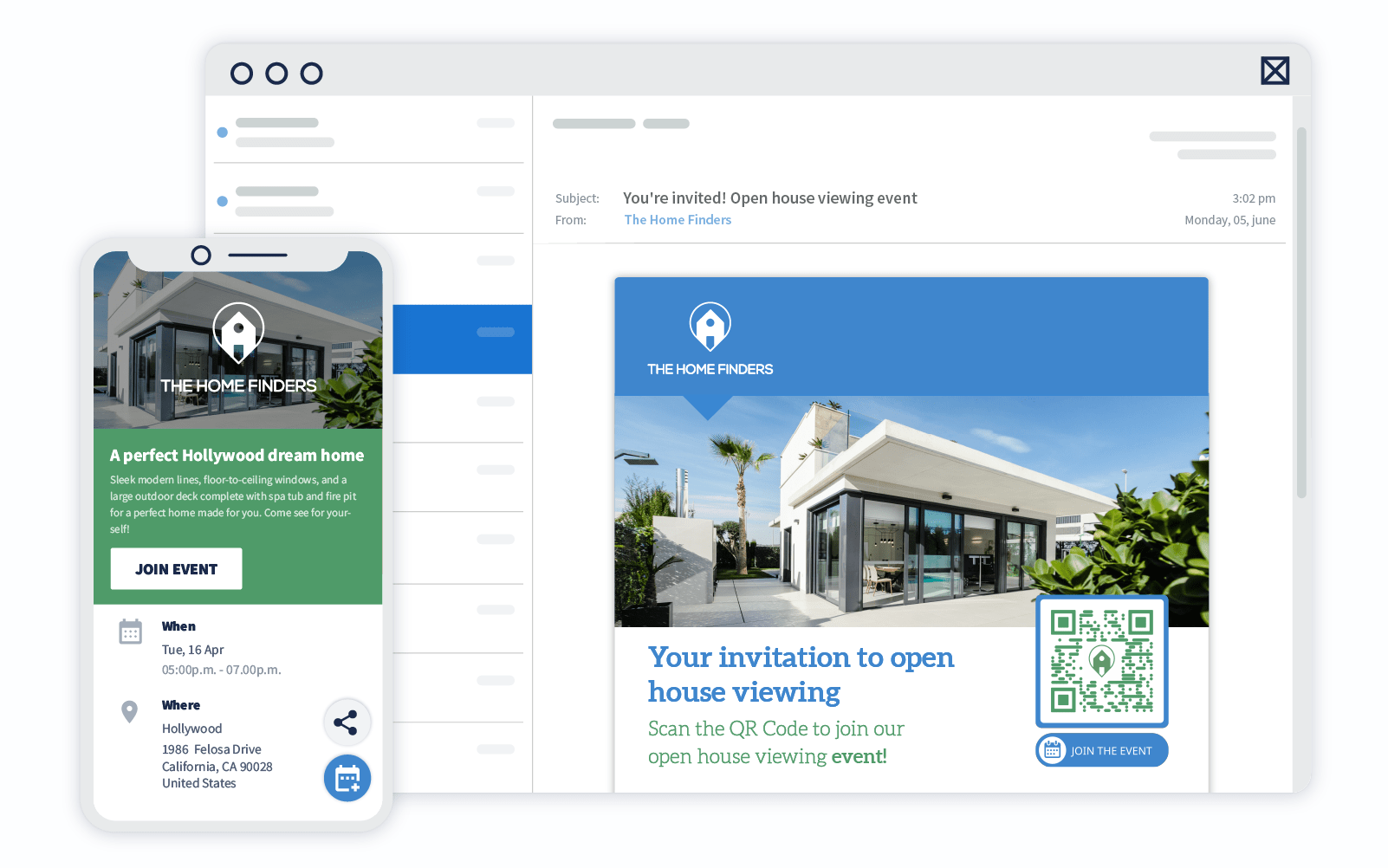
For example, an agency can include in its newsletter a QR that directs to the event registration page or attendance form. This way, interested parties can confirm their attendance, check the location on Google Maps, and add the event directly to their calendar.
In the image, you’ll see how The Home Finders integrated an event QR code both in their email campaign and on the property poster.
Thanks to this, users could see all the event details and register instantly from their mobile, thus increasing participation.
2. Facilitating App Downloads
Another very useful application of QR codes is shortening the app download process. Instead of asking the user to search for your app in the store, a simple scan takes them directly to the correct download page.
A company in the gaming sector, for example, used a QR to lead their computer users to the mobile version of their game. They added it to their emails, social media, and landing pages. The result: more downloads, less friction, and a smoother experience for players.
If you manage an app for your business (a gym, an online store, or a loyalty app), including a QR in your emails is a simple and effective way to increase the download rate without adding unnecessary steps.
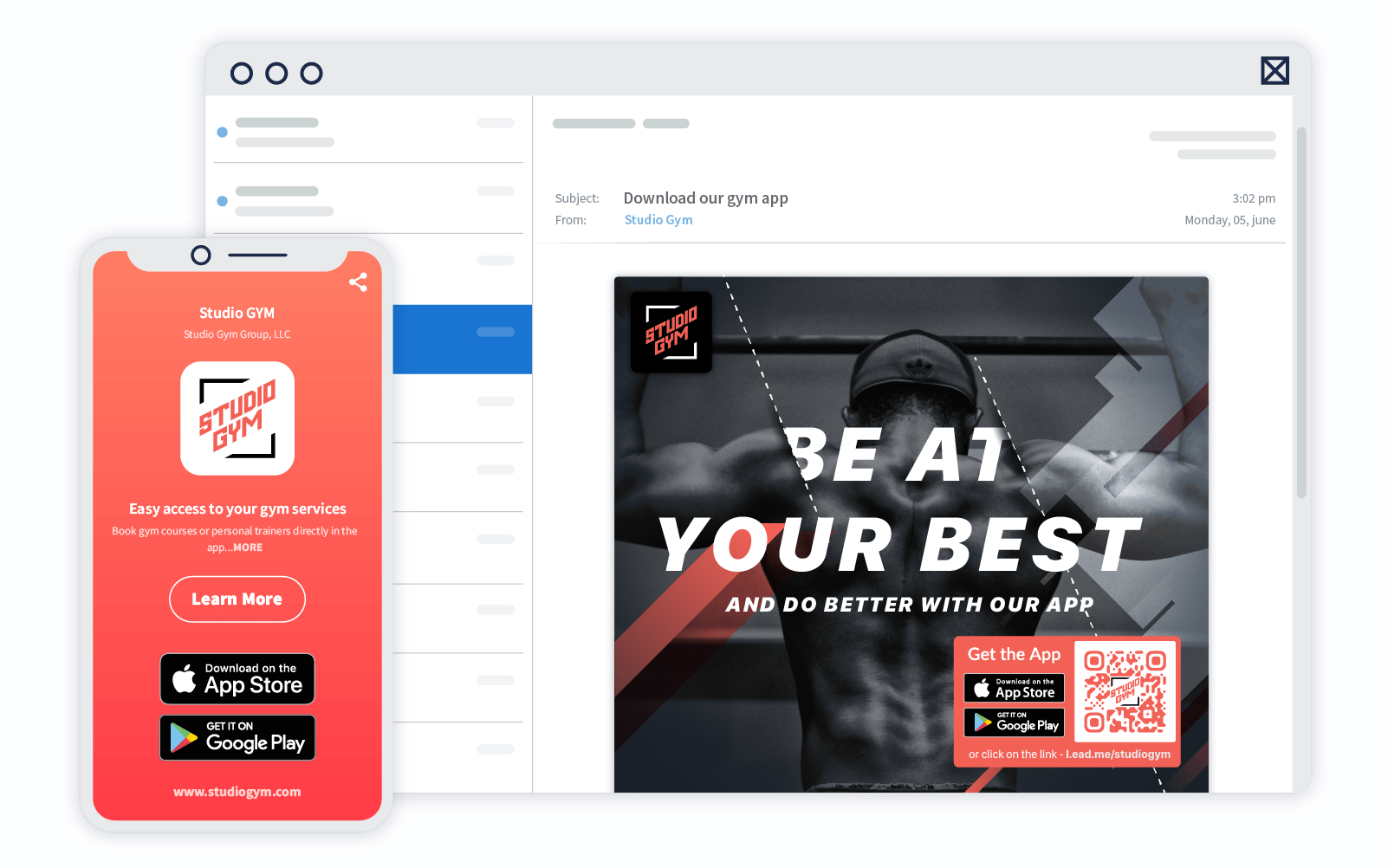
Honestly, I believe this use of QR in businesses that want to promote app downloads is a great advantage.
3. Promoting Mobile Discounts in Retail and Fashion
Fashion brands and retail stores use email as a key channel to communicate offers and promotions. And here, QR codes can make a difference.
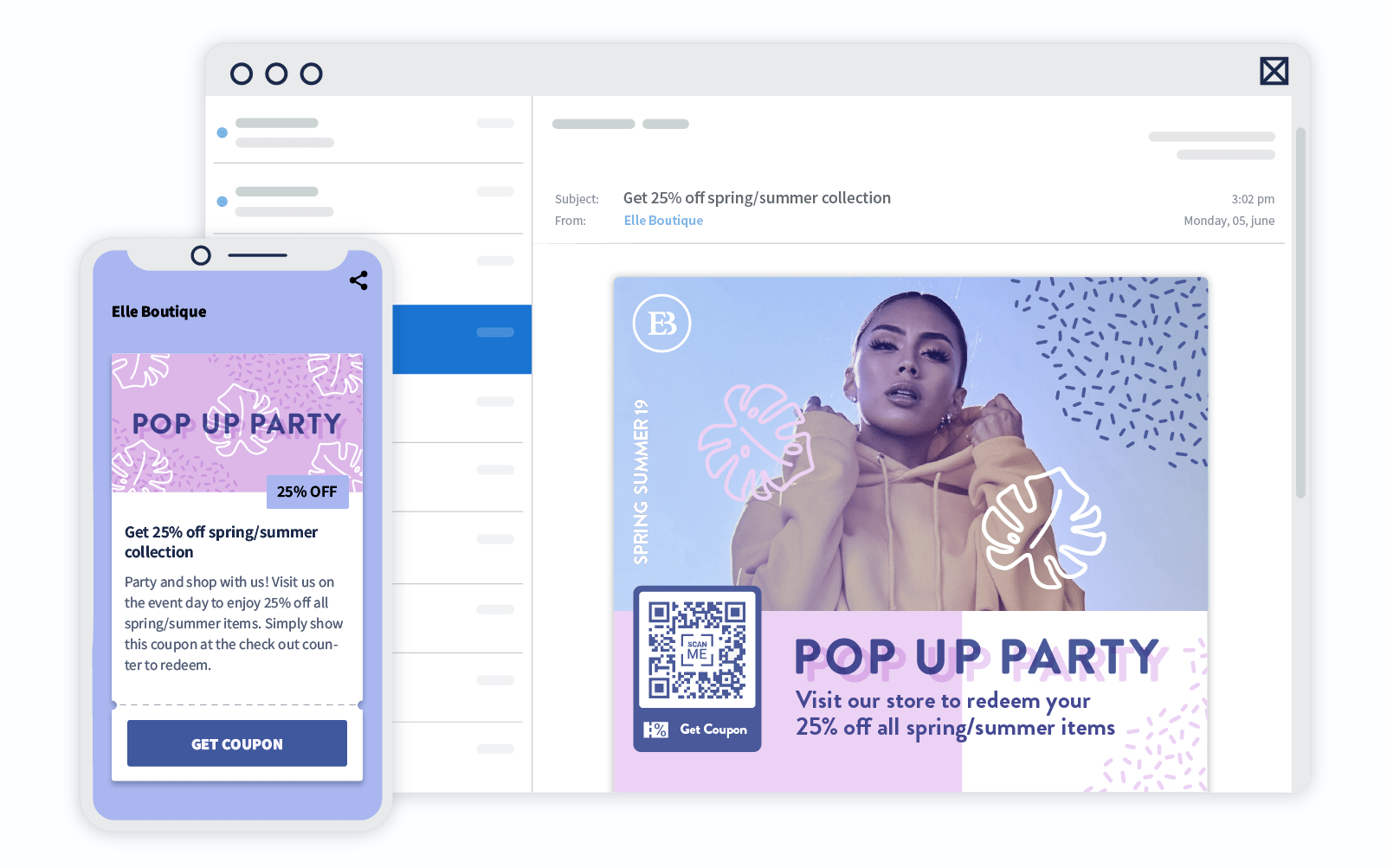
A QR with an exclusive coupon or discount can direct the user to your store’s app, display the promotional code, or activate the offer directly.
For example, Elle Boutique added a QR code in their campaigns to direct users to their mobile app, where conversions were higher than on their desktop website. The result was a notable increase in mobile sales and a more consistent experience for their more digital customers.
Technical Aspects: Dynamic QR, Tracking, and Testing
Static QR codes (those whose link cannot be modified) can work for simple or permanent actions.
But if your goal is to track metrics or update content, dynamic QR codes are the best option.
These allow you to:
- Change the destination link without having to generate a new code
- See how many times it has been scanned and from where
- Detect which devices are most used by your audience
Before sending your campaign, always conduct a complete test: scan the code on various devices, check that the link opens correctly, and that the destination page is mobile-friendly. There’s nothing worse than a broken QR.
Small errors like these can affect your brand’s perception and reduce your subscribers’ trust.
Create Your First QR Code for Free Step by Step
Now that you understand the importance of leveraging QR codes in your campaigns, it’s time to create one.
Incorporating a QR into your newsletter is easier than it seems. You only need a reliable tool to generate it.
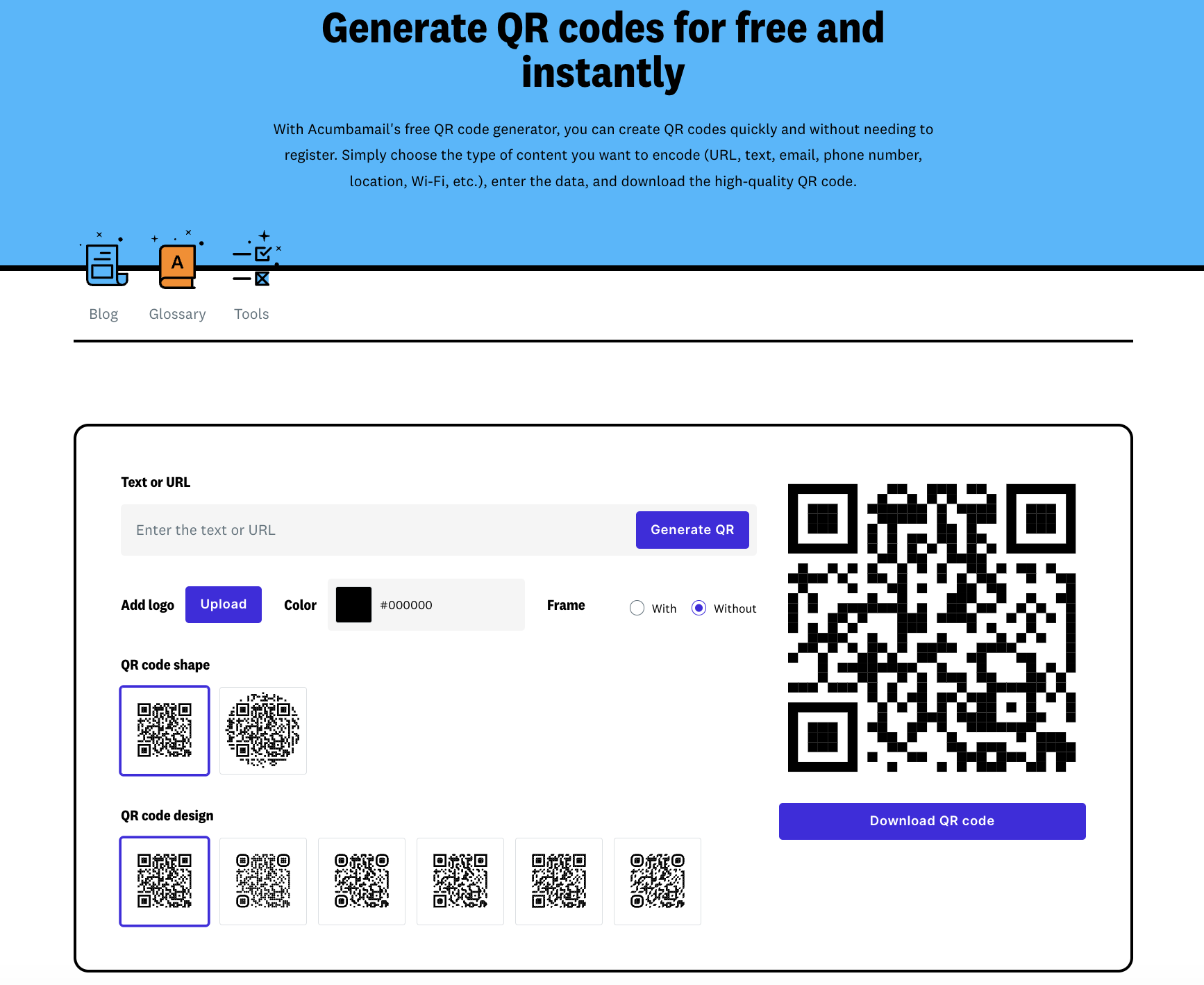
And that tool is the QR generator we have at Acumbamail.
qr-generator
Once inside, you’ll see that the operation is very simple.
- Enter the text or URL you want the QR to direct to
- Customize its design: add your logo, change colors, add a frame, and choose the shape (square or circular)
- Choose the design you like best
- Download the code and upload it to your email template
- Test its functionality before sending the campaign (this is very important)
Did you see how easy it is? And the best part, it’s free!
Tips for Seamless Integration
- Insert the QR image like any other within the email, preferably linked to the same destination as the code in case the user clicks
- Use a minimum size of 200×200 pixels to ensure it reads correctly on computer screens
- If you’re going to measure results, save scan reports and compare them with your email click metrics: this way, you’ll know which channel works best
Mistakes You Should Avoid (and How to Fix Them)
While QR codes can be very effective, it’s also easy to misuse them. Here are some common mistakes:
- Placing the QR without context: always indicate what will happen when scanned (“Download the app,” “Reserve your spot,” etc.).
- Using QR in mobile emails: as we saw, if your audience opens from mobile, also add a clickable link.
- Overloading the email with multiple QR codes: prioritize one per message. More than one creates confusion.
- Not testing before sending: a simple test can prevent losing conversions and credibility.
Success lies in balance: using the QR as a visual and functional reinforcement, not as a decorative element nor as a total substitute for the link.
In Conclusion
QR codes offer a simple and visual way to connect your email marketing with the rest of your digital channels. When used wisely (and not just for fashion), they can improve engagement, facilitate conversion, and open new opportunities for tracking and personalization.
In summary:
- Define a specific goal before using a QR
- Ensure the design, size, and placement are appropriate
- Use dynamic QR codes to measure and edit your campaigns
- Don’t forget to test and always offer a clickable alternative
Now that you know how to do it right, try including a QR code in your next campaign and measure the impact.
You can start in minutes using a free tool like Acumbamail’s QR generator, where you can create, customize, and track your codes at no cost.
A small action that can open great opportunities for connection with your subscribers.