LinkedIn for Businesses: The Guide You Need to Stand Out on the World’s Largest Professional Network
 Alicia Zunzunegui · 02 Mar, 2026 · Marketing Online · 7 min
LinkedIn has become an essential tool for companies looking to expand their reach, attract talent, and build strategic relationships.
It has over 900 million users worldwide. This makes it the professional social network that offers a unique opportunity to establish connections with other professionals and position yourself as a leader in your sector.
In this guide, you will learn step by step how to optimize your presence on LinkedIn, from creating an effective business page to implementing content strategies that generate tangible results.
If your goal is to make the most of this professional network, keep reading to discover everything you can do with LinkedIn for businesses.
LinkedIn, the Best Ally for Your Business
LinkedIn is not just a social network. It is a professional ecosystem that connects companies with employees, partners, and potential clients.
Unlike other social networks, LinkedIn is specifically designed to create business opportunities and foster relationships with other professionals.
According to recent data, 80% of B2B leads come from LinkedIn, making it the leading platform for generating business in this sector. Additionally, sectors such as technology, consulting, and professional services have a strong presence, making it a strategic place for companies looking to stand out in competitive sectors.
For companies in the B2C field, LinkedIn can also be key in building credibility and attracting consumers who value transparency in their favorite brands.
So, whether your business is focused on B2B or B2C, having a presence on LinkedIn is important.
Let’s see how you can create your page on LinkedIn.
Guide to Creating Your Company Page on LinkedIn
Before discussing how you can optimize your company page, it’s essential to set it up correctly.
Here are the steps to create a business page and lay the foundation for achieving your business goals.
Step 1. Create a Personal Account on LinkedIn
To start, you need a personal account on LinkedIn. This account will be the administrator of your business page.
Once your personal account is created, you’ll be ready to set up your company page.
Step 2. Access the “Create a Company Page” Option
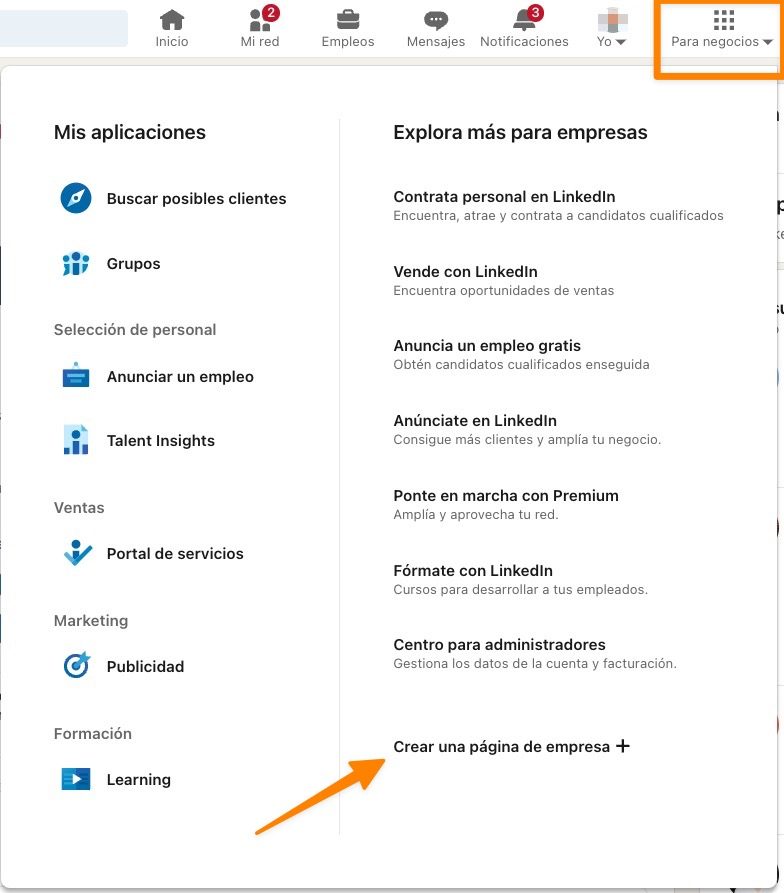
Log in to your personal account and click on the Products icon in the upper right corner of the screen. From the dropdown menu, select the “Create a Company Page +” option.
LinkedIn will offer you three options for the type of page you can create:
- Company. For businesses of any size looking for a professional presence on the platform.
- Showcase Page. Ideal for dividing specific areas of a company under a main page.
- Educational Institution. For schools, universities, or training centers.
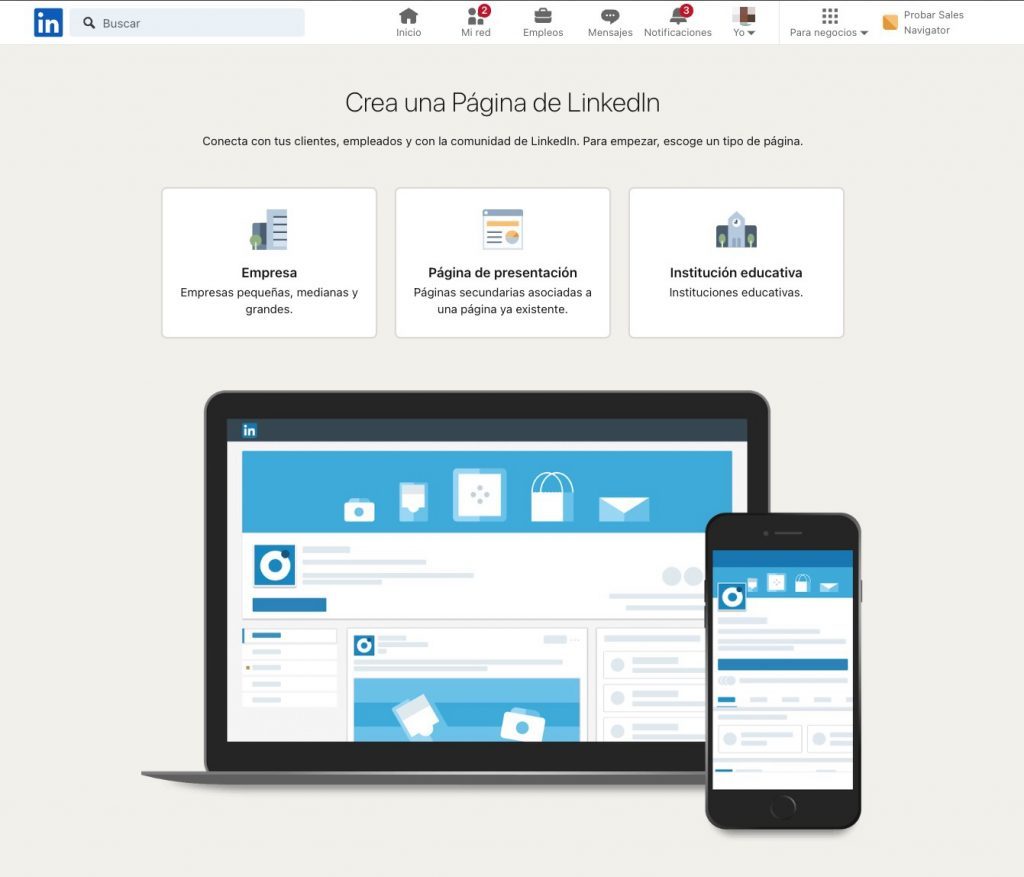
Choose the option that best suits your needs.
For example, if you run a small or medium-sized business, the Company option will probably be the most suitable.
Step 3. Complete the Basic Information
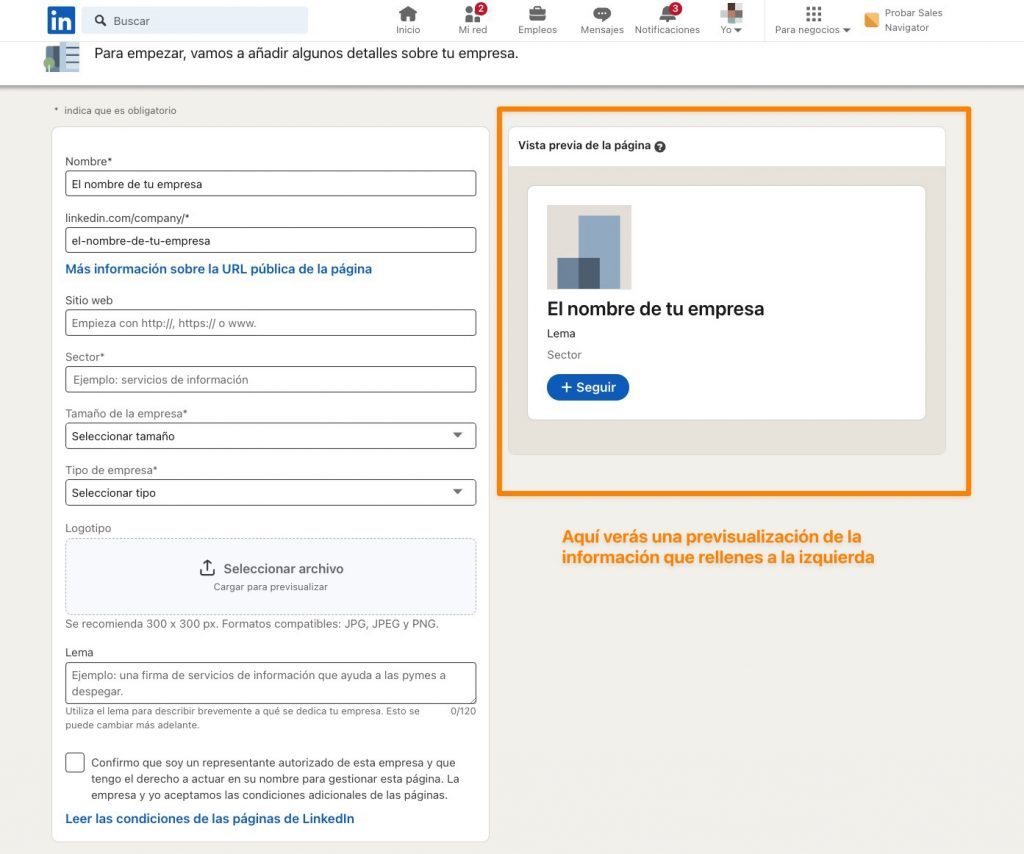
Fill in the requested fields, including your company name, the public LinkedIn URL you wish to use, and other basic information.
Additionally, it is recommended that you upload your company logo and write an attractive slogan to capture attention.
Take your time with this step as these elements will be the introduction of your business on LinkedIn.
Step 4. Customize the Page with Key Elements
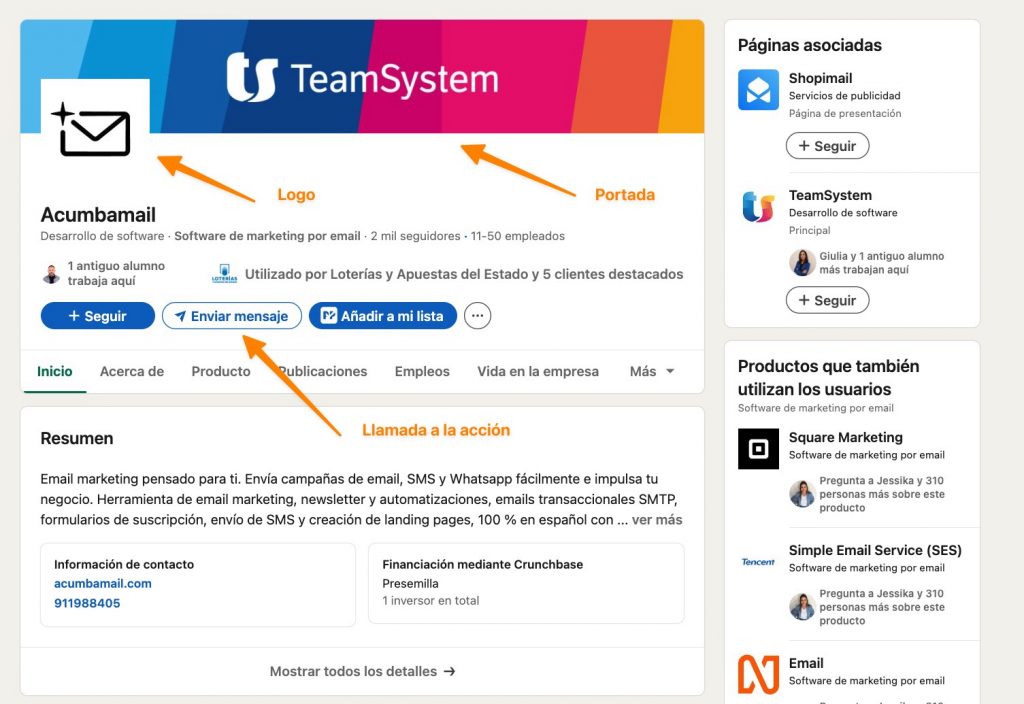
- Cover Image. Upload an image aligned with your brand identity. It can be a featured product, a key message, or a design that reflects your value proposition.
- Custom Button. Next to the Follow button, you can add a CTA (call to action) like Contact Us, Sign Up, or Visit Website. This button should guide users towards a strategic action for your business.
Here’s an example of how our Acumbamail page on LinkedIn looks (you can follow us to stay updated on what we publish there 😉)
Step 5. Click “Create Page”
Review all the data and ensure there are no errors.
Once checked, click Create Page.
Done! You now have a business page on LinkedIn ready to be optimized.
Once you have the company page created, it’s time to fine-tune it to stand out in the sea of company pages on LinkedIn.
How to Optimize Your Company Page on LinkedIn?
A good first impression makes the difference in attracting professionals interested in your brand.
There are three things you should pay attention to in order to optimize your profile:
- Profile and Cover Image. Use your company logo as the profile image and ensure the cover image reflects your mission, vision, or key products.
- Clear Description. Explain who you are, what you do, and why someone should follow you. Incorporate relevant keywords to appear in searches within the platform.
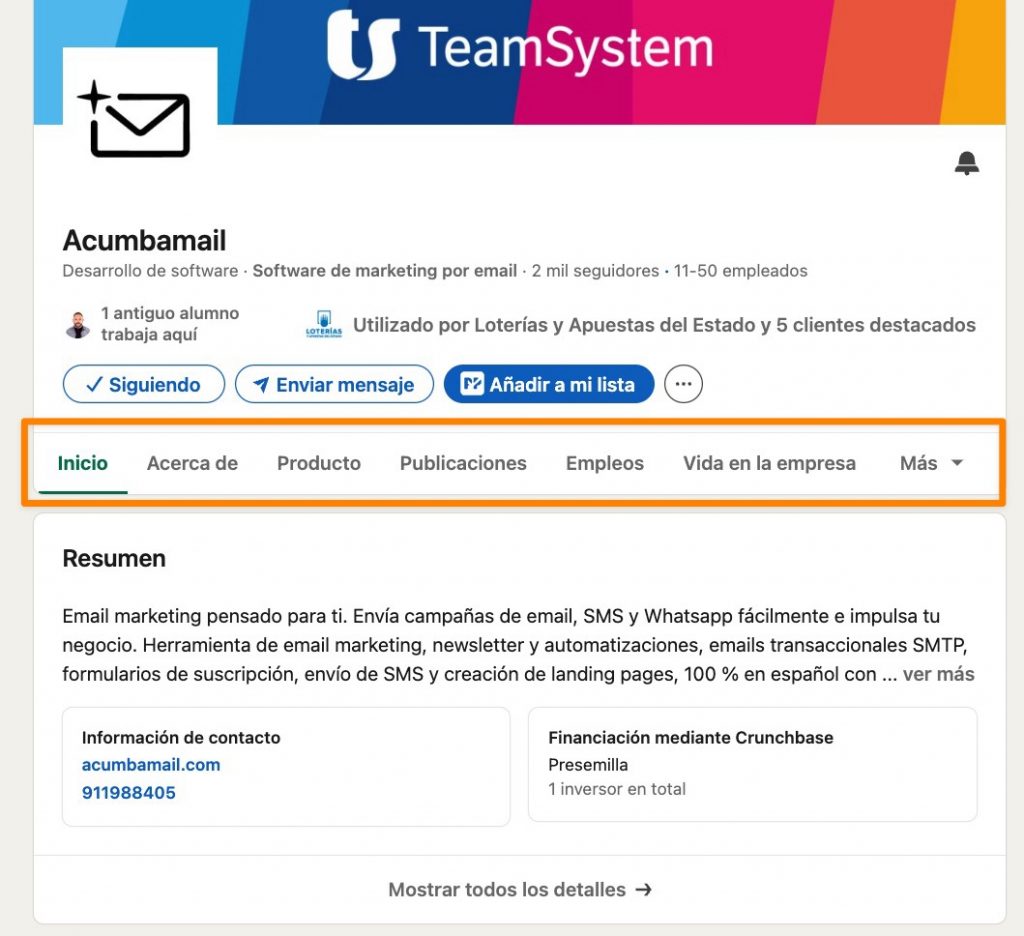
- Updated Data. Complete all fields, from industry and company size to a direct link to your website. Complete pages get more visits and engagement.
All this information is what will be seen in the different tabs of the page. Here’s a screenshot of the sections I’m referring to:
Checklist to Perfect Your Business Profile
To ensure your company page is ready to stand out, check these key points:
- Do you have a professional profile image and an attractive cover?
- Do you include a clear and optimized description with keywords?
- Are all your data updated and complete?
- Do you use an effective call to action (CTA) to invite users to follow your page or take another action like sending a message or visiting your website?
Content Strategies That Work on LinkedIn
Now that you have your page created and optimized to look perfect, it’s time to delve into the crown jewel of any social network: content.
Content is the heart of your strategy on LinkedIn. Well, and of any strategy on the Internet.
Posting regularly and providing value to your audience will help you position yourself as a reference in your sector.
5 Types of Content That Work Best on LinkedIn
The most successful types of content on LinkedIn are:
- Long Articles. Perfect for sharing knowledge and standing out as an expert.
- Videos. Brief, engaging, and direct; they generate up to 20% more interaction.
- Polls. Ideal for engaging your community and gathering relevant data.
- Carousels. Posts with multiple slides that allow sharing visual and practical content in an interactive format. For example, you can use a carousel to break down data, tell stories, or share step-by-step tutorials. This format is perfect for keeping the user’s attention and encouraging the post to be saved.
- Infographics. This type of content combines text and images to convey information clearly and attractively. They are ideal for complex data, such as statistics or processes.
3 Tips for Your Content to Succeed
However, posting content on LinkedIn is just the first step. The real challenge is to ensure that this content reaches the right audience and makes an impact.
Here are three key tips to maximize the success of your posts:
1. Know Your Audience and Their Problems
Before creating any content, it’s essential to understand who your target audience is. Think about their needs, pain points, and topics of interest.
For this, creating your buyer persona will surely help.
2. Use Visual Formats and Clear Texts
Visual content performs better on LinkedIn, but it should complement texts that are concise and direct.
Accompany your posts with attractive images, graphics, or videos. If you use carousels, make sure each slide has a clear message that keeps users interested.
Pro Tip: LinkedIn allows you to add automatic subtitles to videos. Make sure to activate them to facilitate understanding, especially for users browsing without sound.
3. Post at the Right Time
The time and day you post have a significant impact on the reach of your content. On LinkedIn, the best times are usually during the week, especially in the mornings and at lunchtime, when users are typically active.
However, it’s best to understand your audience and when more impacts and interactions are generated to enhance that timing.
Essential Bonus: Interact and Encourage Participation
Posting is not enough. In fact, the LinkedIn algorithm rewards something else: interaction.
It’s important to interact by commenting on other posts, encourage comments on yours, and respond to your audience’s questions. This type of interaction fosters participation and improves the visibility of your content in the LinkedIn algorithm.
Leverage LinkedIn Ads to Boost Your Brand
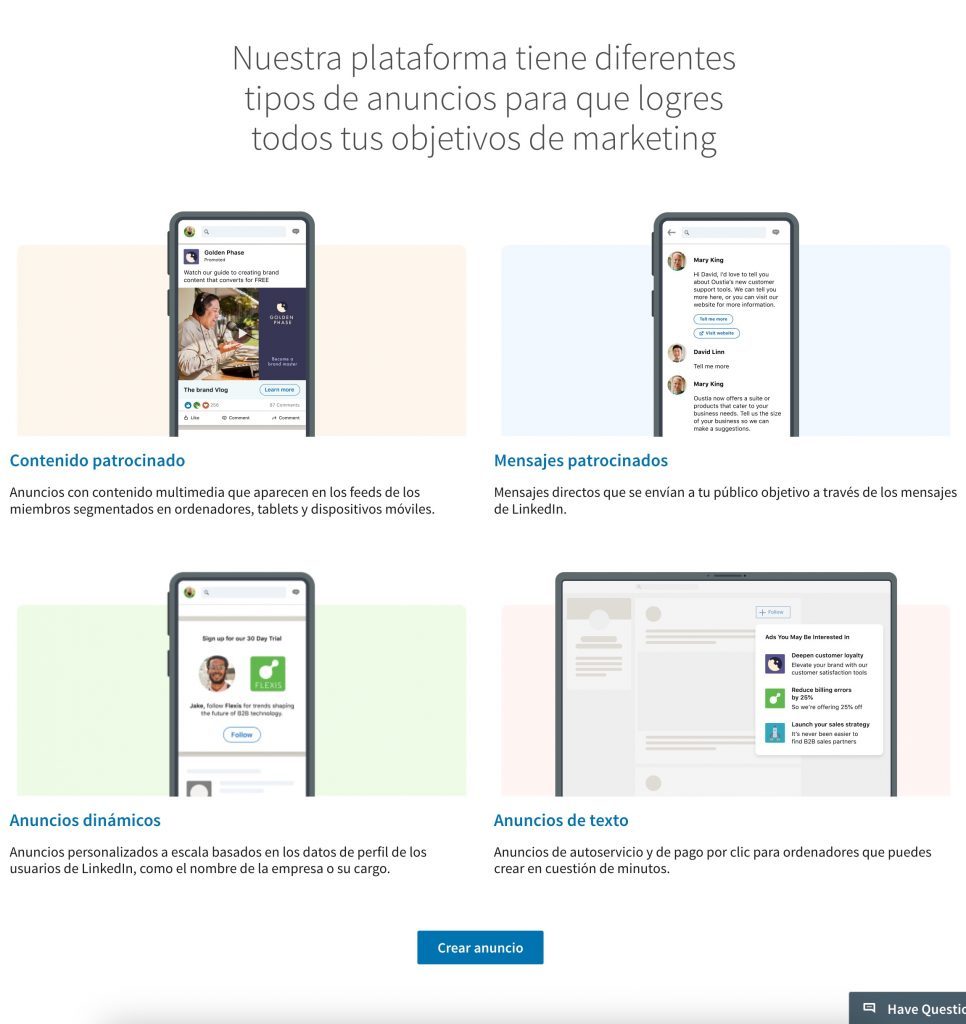
LinkedIn Ads is a very powerful advertising tool to achieve specific goals, from brand recognition to lead generation.
The options they allow and you can use are:
- Sponsored Content. Ideal for promoting posts in your audience’s feed.
- Sponsored InMail Messages. Useful for sending personalized messages to specific users. Direct messages seen on any social network.
- Dynamic Ads. Automatically adapted to each user, increasing their effectiveness.
- Text Ads. Consist of a brief text accompanied by a small optional image. These ads appear at the top, bottom, or side of the page, mainly on the desktop version of LinkedIn. Their goal is to drive traffic to a specific webpage or promote specific offers.
What Type of Campaign is Right for Your Business?
If you’re looking to drive traffic to your website, opt for sponsored content. However, if your goal is to generate quality contacts, use InMail messages to directly target profiles that interest you within your lead generation strategy.
How to Measure Success on LinkedIn?
What a question, right? Surely you’ve asked yourself this at some point.
Analyzing the performance of your page as well as the time invested is crucial to adjust and improve your strategy. LinkedIn offers advanced tools to measure the performance of your posts and campaigns.
Some of them are:
- Engagement: How many clicks, reactions, and comments are you generating?
- Reach: How many people see your posts?
- Clicks: How many people interact with the links you share?
Note: If you subscribe to the paid plan (LinkedIn Premium), you have access to more comprehensive metrics.
For example, with LinkedIn Premium, you can access detailed information about who has visited your profile, including demographic data and behavior patterns, which is not available in the free version.
Additionally, advanced analytics tools allow you to monitor key metrics such as follower growth, engagement rate, and specific post performance, facilitating the optimization of your strategy on the platform.
Conclusion
LinkedIn offers a wealth of tools and opportunities for companies that want to expand their presence and build strategic relationships. From optimizing your profile to measuring the success of your campaigns, every step you take on this network can bring you closer to your business goals.
Start implementing the strategies I’ve shared in this LinkedIn for Business guide and watch how LinkedIn becomes a key ally for your business.