Your email is mobile-optimized… but what if SMS did that job better?
 Lucía Pérez · 14 Oct, 2026 · Email Marketing: First Steps · 7 min
You’ve adjusted the template, enlarged the buttons, and ensured the text is readable without zooming. Great, your email is now mobile-ready.
But there’s another question you should ask yourself: is email the most suitable channel for what you need to communicate at that moment?
A newsletter, a product comparison, or a service explanation need space. However, a reminder for an appointment starting in an hour has a different priority: ensuring the recipient receives the information on time.
That’s where the text message or SMS comes in.
Combining email marketing and SMS marketing allows each message to have the format, timing, and channel it needs. Let’s see how to do it and how to bring that combination to automation in Acumbamail.
The mobile is the starting point for your campaigns
In the report Email Usage Habits in 2024 by Mailjet, 71.5% of respondents stated they checked and read their emails more frequently from their mobile phones.
The study includes responses from over 2,000 consumers from Spain, France, Germany, the United Kingdom, and the United States. You should know that this is data about their declared habits, not a percentage of all email campaign openings.
But what interests us about that percentage is the following: many people will encounter your message on a small screen, while doing other things, and with little time to decide if they are interested.
That’s why thinking mobile first (mobile first) starts before choosing a template. It also affects what you say, the order in which you present it, and the action you ask for.
The 6 basics an email must meet for mobile
Before adding another channel, check that your emails allow the message to be understood and acted upon without obstacles.
- An easy-to-navigate structure. A single column usually facilitates reading. If you use multiple columns, check how they rearrange on a small screen.
- Readable text. Avoid forcing the reader to zoom in. As a starting point, try a text body of 16 px or more and check the result on a mobile phone.
- Short paragraphs and clear hierarchy. The reader should identify what you offer and what they can do even at a glance.
- Buttons easy to press. Leave space around to avoid accidental clicks, especially if there are several links together.
- Important information also in text. If the entire offer is within an image, its loading or blocking may prevent understanding the email.
- Subject and preheader that complement each other. Put the essentials at the beginning of the subject and use the preheader to add context.
The review should continue after the click. A slow landing, a form difficult to complete, or an uncomfortable purchase process can ruin a well-designed email.
Here we talk in detail about the European Accessibility Act.
Do a full test: open the email from your mobile, press the button, and go through the action you expect from the customer. This way, you are more likely to detect problems that the editor’s preview does not show.
A mobile-adapted email still needs attention
That a message looks good solves part of the work, but there’s still a very important part: it needs to reach the inbox, spark interest, and be read at a useful moment.
This weighs more when the information expires quickly. If an offer ends tonight or a reservation time changes, reading the notice tomorrow may be too late.
SMS offers another way to communicate brief information on the same device. Its usefulness depends on having a reason to use it and the recipient expecting that type of message.
How to combine email marketing and SMS marketing?
Before designing a campaign, assign a function to each channel.
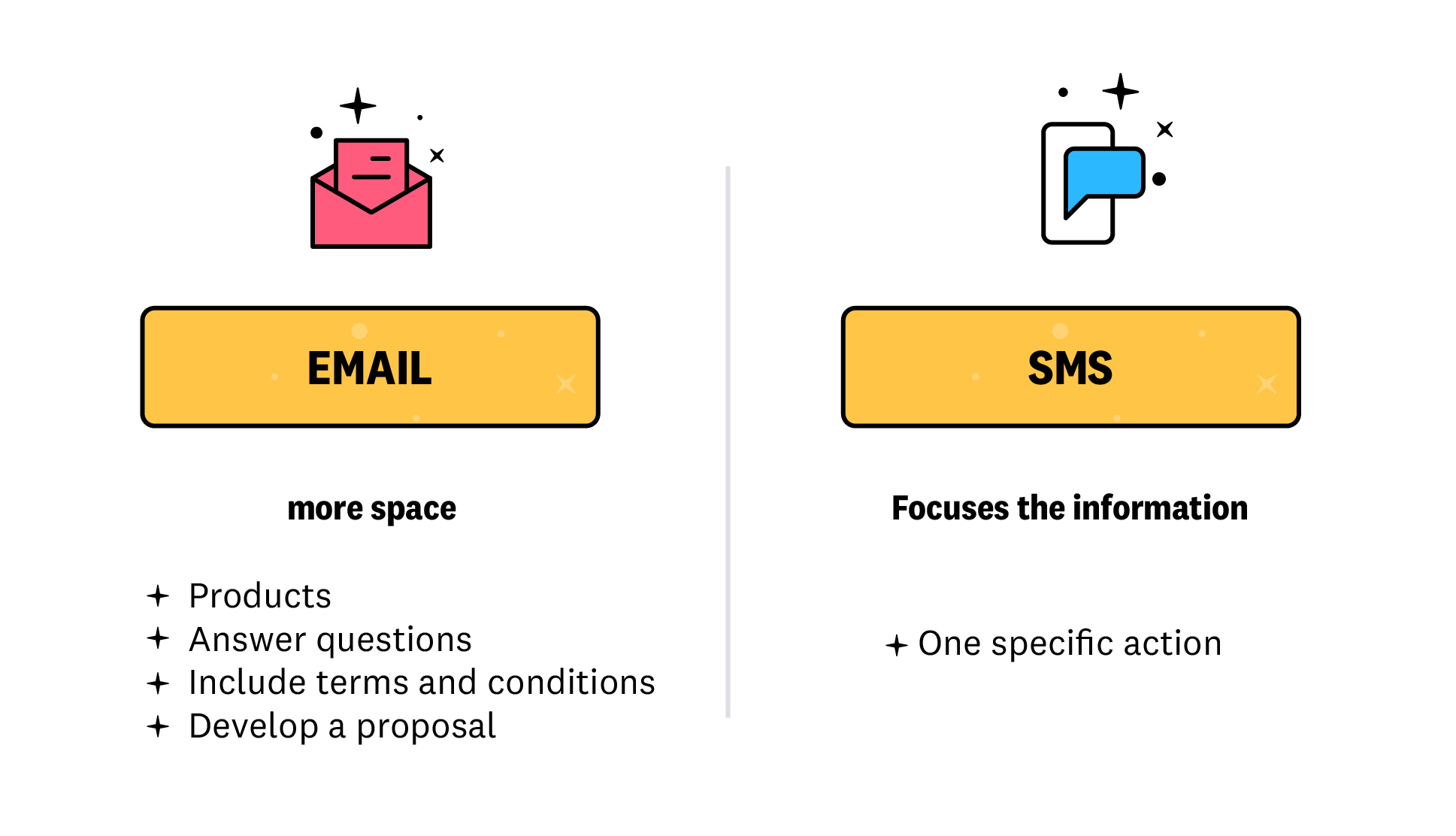
For example, you can send the program of an online event, the speakers, and access instructions via email. On the day of the event, an SMS can remind the time and provide the link to enter.
Each message contributes something at a different time. Let’s look at some typical situations.
| Situation | What the email provides | What the SMS provides |
| Abandoned cart | Pending products, purchase information, and doubt resolution | A brief reminder to resume the purchase |
| Reservation or appointment | Confirmation and details worth keeping | Reminder close to the appointment |
| Flash offer | Included products, conditions, and benefits | Notice of a relevant deadline |
| Urgent change | Explanation of the change and alternatives | The essential information to act |
If you need a guide to start exploring SMS in your business, you can check this SMS marketing guide.
When does it make sense to support an email with an SMS?
The main criterion is what the second message adds. Here are some cases where the combination can be useful.
1. Abandoned cart reminders
A person adds products to the cart and leaves the purchase pending. The first email can show what they selected, facilitate returning to the cart, and resolve doubts about shipping or returns.
If they still don’t buy, you can consider a subsequent SMS for contacts enabled to receive commercial communications through that channel.
SMS example: “[Store Name]: your cart is still pending. You can resume it here: [link]. Unsubscribe: [link].”
Avoid assuming you need to offer a discount. Sometimes the customer just needs to return to where they left the purchase.
The decisive condition is that the cart remains pending. If they have already purchased, they should stop receiving reminders, even if they haven’t opened the email.
To do this, you need your store to communicate that status to the platform. The flow design depends on the integration and available data.
2. Confirmations and appointment reminders
The email can gather the details of a reservation: date, address, conditions, and modification options.
The SMS can support that communication when the appointment is approaching or confirm a piece of information the client needs to have on hand.
SMS example: “[Business Name]: we remind you of your appointment tomorrow at 10:30. Manage your reservation: [link].”
The interval should make sense for the service. An appointment requiring travel may need more notice than an online session.
Keep service notices and promotions separate. Adding an offer to a confirmation changes the message’s purpose.
3. Flash offers with a real deadline
The email presents the promotion and allows consulting its conditions. The SMS can remind the closing to an interested segment that hasn’t yet purchased.
SMS example: “[Store Name]: the discount on the fall collection ends today at 22:00. Check conditions: [link]. Unsubscribe: [link].”
Segment according to the relationship with the offer: prior interest, purchased category, or campaign participation. And exclude those who have already taken action.
Here we talk in detail about how to segment correctly and give ideas.
It’s also advisable to distinguish between a real deadline and an artificial urgency. The SMS should communicate a useful date for deciding.
4. Changes and urgent notices
A change of location, a cancellation, or an issue with a delivery may justify a brief SMS notice.
The email provides the full explanation. The SMS must contain the essential information on its own.
SMS example: “[Academy Name]: today’s class at 18:00 moves to room 3. We’ve sent you the details by email.”
With that message, the recipient already knows what has changed. They don’t need to open the email to discover the information that immediately affects them.
5. Notices when no opening is registered
You can consider an SMS if an action remains pending and the email does not register an opening, especially when there is a deadline.
But the opening is a limited signal. The Apple Mail Privacy Protection prevents senders from accurately knowing user activity.
Therefore, “no opening registered” does not necessarily mean “it hasn’t been read.” Whenever possible, also use the status of the purchase, reservation, or registration.
For a registration reminder, the relevant question is whether the person is still not registered and if it still makes sense to notify them.
How to add an SMS to an Acumbamail automation?
In Acumbamail, you can include an SMS within a flow and combine it with emails, waits, and conditions. The guide to creating automations explains its configuration step by step.
I’ll explain the phases that such automation would have for a reminder campaign:
- Define the entry. Choose the list or segment and the initial event.
- Add the email. Use the template module to send the main communication.
- Introduce a wait. Leave an appropriate interval before the reminder.
- Set the condition. You can evaluate list fields or behaviors like opening and clicking.
- Add the SMS to the corresponding branch. Select the phone field and configure sender and text.
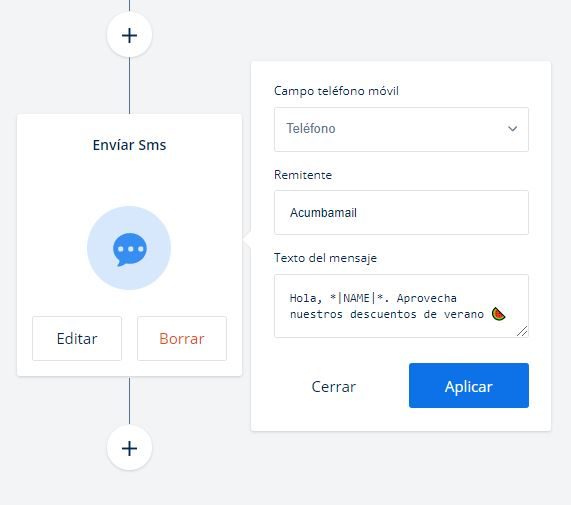
- Review and activate the flow. Check recipients, timings, links, and exclusions.
Importantly, if you want to exclude buyers, their status must reach Acumbamail and be updated before evaluating the condition.
What to review to ensure both channels work together?
Automation facilitates execution, but it needs clear rules. Before activating it, review these points.
Permission for the channel and accessible unsubscribe
Having a phone number to manage a delivery does not automatically mean you can use it for promotions.
For commercial SMS, verify consent or the applicable legal exception and provide an easy way to opt-out. The AEPD outlines the conditions for electronic commercial communications.
In the acquisition, explain what messages the person will receive through each channel and retain the necessary information to prove their choice.
Coordinated frequency and schedules
Count all the impacts a contact can receive. An automated SMS can coincide with a newsletter and another promotion.
Set limits, appropriate schedules, and exclusions. When the person completes the action, stop the associated reminders.
Text, link, and cost
Identify your brand, communicate a main idea, and use a recognizable link when necessary.
Check the length and encoding before sending: certain characters or emojis can modify the number of segments and the cost. Also, ensure the destination works from the mobile.
And before finishing, a question you might be asking yourself.
How to know if adding SMS improves results?
To evaluate the combination, compare the business result.
You can divide a comparable segment into two groups: one receives only the email and the other receives the email plus the planned SMS. Keep the offer, period, and participation conditions the same.
Then review:
- Additional purchases, reservations, or registrations
- Cost of SMS versus generated margin
- Unsubscribes and signs of rejection
- Time to complete the action
Clicks help understand the journey, but the decision should be based on the campaign’s goal. A reminder can be useful if it recovers reservations; however, a promotion needs to generate enough margin to justify the send.
Start with a campaign and a specific action
Choose a case where a brief notice can add value: an upcoming appointment, a pending cart, or a promotion with a closing date.
Define what the email explains, what the SMS reminds, and what condition stops the sends. Then measure the result.
With Acumbamail automations you can coordinate both channels within the same flow. Prepare your first sequence, incorporate the SMS where it has a specific function, and see what it adds to your campaign.
Your email must work on mobile. The next step is to decide which messages benefit from a second channel.