Express Diagnosis for Stagnant Campaigns: What to Review and How to Optimize with Real Data
 Yacarlí Carreño · 03 Jun, 2026 · Email Marketing: First Steps · 5 min

Are your campaigns not working? We help you review them so you can achieve results with real data and optimization.
There’s something worse than a failing campaign: a campaign that seems to work… but doesn’t grow.
Stable opens, flat clicks, conversions that don’t take off. Everything “correct,” but nothing improves. And that’s where many email marketing strategies get stuck for months.
If this sounds familiar, you’re not alone.
According to data collected by Statista (2024), average open rates in email marketing vary by sector, generally ranging between 20% and 40%, while CTR usually moves between 2% and 5%.
This is where a good express diagnosis for stagnant campaigns comes into play: reviewing the essentials, detecting blockages, and applying quick improvements based on data, not just intuition.

Let’s get to the point 👇
What does it mean for a campaign to be stagnant?
It’s not always about low results. A campaign is stagnant when:
- It doesn’t improve over time
- It doesn’t respond to changes (tests, segmentation, etc.)
- It maintains flat metrics over several campaigns
- It doesn’t scale even if you increase the volume of sends
In other words: it doesn’t evolve.
And in email marketing, not evolving is moving backward. That’s how it is.
Step 1: Check deliverability (the invisible problem)
Before analyzing opens or clicks, you need to answer a basic question:
👉 Are your emails getting through?
According to the Validity report (2023), approximately 16% of commercial emails don’t reach the inbox.
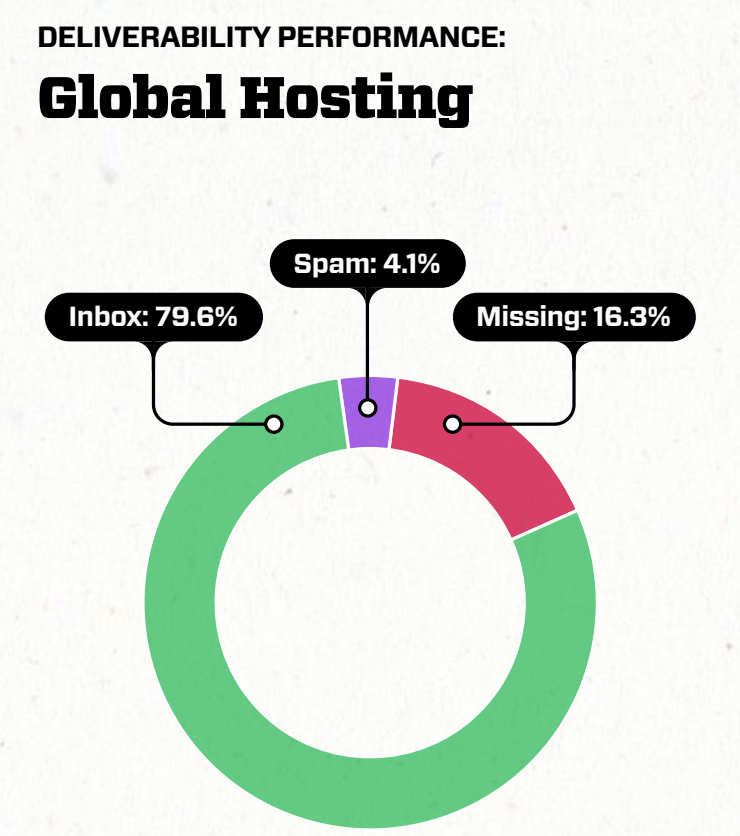
This means you could be losing results without realizing it.
What to review:
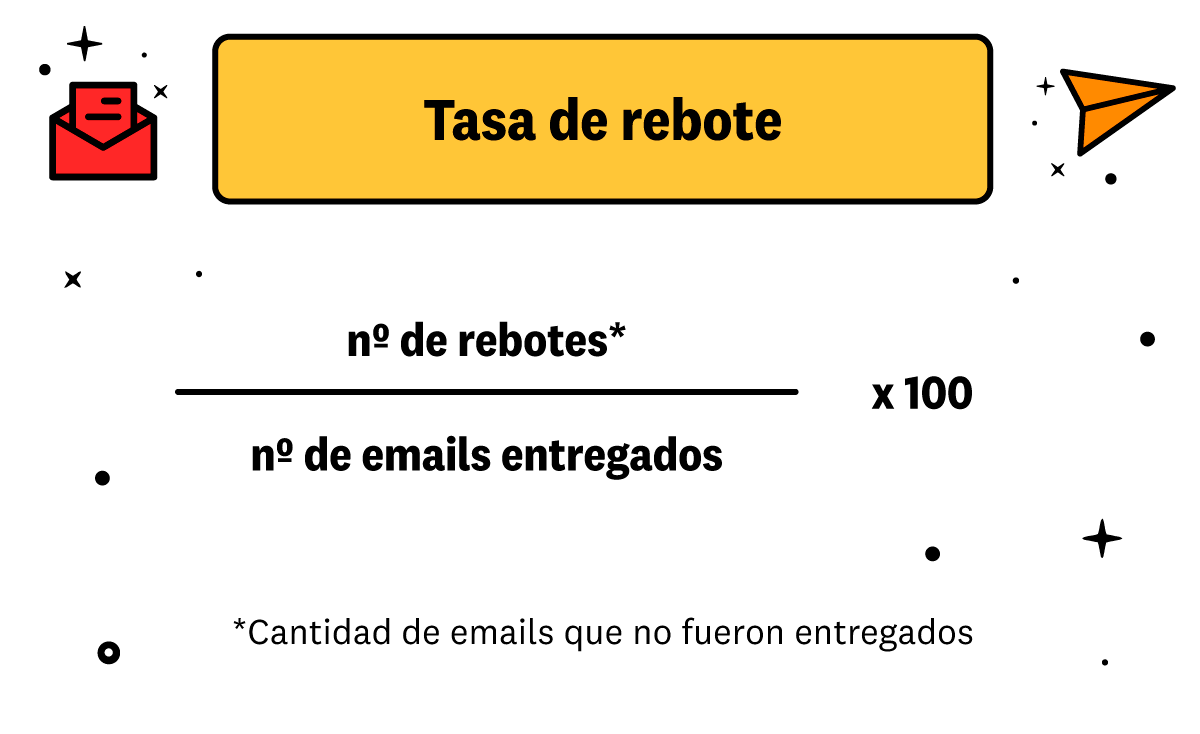
- Bounce rate
- Domains and authentication
- Domain reputation
- Sending frequency
How to optimize:
- Clean your database regularly
- Remove inactive contacts
- Avoid sudden sending spikes
*On platforms like Acumbamail, you can monitor deliverability metrics and detect problems without technical complications.
Step 2: Analyze the open rate (but with context)
Opens are not what they used to be.
With privacy changes (such as Apple Mail Privacy Protection), this data may be inflated or distorted.
Still, it remains useful if interpreted correctly.
Warning signs:
- High opens but few clicks
- Sudden unexplained variations
- Consistently low opens
What to review:
- Subject lines
- Preheader
- Sender name
According to Campaign Monitor, personalized subjects can increase the open rate by up to 26%.
How to optimize:
- Conduct A/B tests on subjects
- Use clear language (less “empty creativity”)
- Connect subject + content
Step 3: Low CTR = content problem (almost always)
If people open but don’t click, the problem isn’t in the subject.
It’s in the content.
According to the State of Personalization report by Twilio Segment, personalization improves loyalty and recurrence, reinforcing the importance of tailoring content to each user to enhance interaction and clicks in email campaigns.

What to review:
- Consistency between subject and content
- Message clarity
- Number of CTAs
- Design and visual hierarchy
Clear problem signals:
- Too many elements in the email
- Unclear message
- CTA not visible enough
How to optimize:
- One main idea per email
- Clear CTA
- Less text, more structure
Step 4: Segmentation (the great forgotten)
This is usually the biggest problem.
Many campaigns are stagnant because they continue to be sent the same way to the entire database.
And that no longer works.
According to Salesforce (State of Marketing 2023), 84% of customers say the experience is as important as the product.
And the experience starts with relevance.
What to review:
- If you send the same to everyone
- Possible segmentation by behavior
- If you consider recent activity
How to optimize:
- Segment by clicks…
- By purchases…
- Or… by engagement
👉 With Acumbamail, you can create dynamic segmentations without technical developments.
Step 5: Frequency and timing
Sending too much… or too little.
Both affect.
According to Statista (2024), one of the main reasons for unsubscribing from newsletters is the excessive frequency of emails.
What to review:
- Frequency
- Sending times
- Possible user saturation
How to optimize:
- Try different days
- Analyze engagement peaks
- Avoid unnecessary sends

Source: Unsplash
Step 6: Review the entire funnel (not just the email)
Often the problem isn’t in the email.
It’s afterward.
👉 Landing page👉 Purchase process👉 User experience
According to Google (Think with Google), 53% of users abandon a page if it takes more than 3 seconds to load.
What to review:
- Landing speed
- Consistency with the email
- Ease of conversion
Step 7: Automation (or lack thereof)
One-off campaigns work.
But automations convert better.
According to Statista data (2024), automated emails show superior performance in key metrics such as open and conversion rates compared to standard campaigns, reinforcing their role as one of the most effective tools for generating revenue in email marketing.
What to review:
- If you have active flows
- Leveraging the customer lifecycle
Key automations:
- Welcome
- Abandoned cart
- Post-sale
- Reactivation
👉 With Acumbamail, you can create these flows without code and optimize them easily.
Real case: how optimization improves results
An interesting case is Sephora, which has focused on personalization as the core of its customer relationship. As Harvard Business Review explains, brands that best use behavioral and preference data achieve much more relevant and effective communications. The key, also in email marketing, is not to send more, but to send better: with more context, more segmentation, and more meaning for each user.

Quick checklist: express diagnosis for stagnant campaigns
If you want a quick version, here it is:
✔ Are your emails getting through?✔ Do your subjects generate real opens?✔ Is the content clear and actionable?✔ Are you truly segmenting?✔ Is your frequency appropriate?✔ Does the funnel work?✔ Do you have active automations?
If you fail in more than two… you have room for improvement (and you need to get to work). As we have mentioned throughout the article, if this is the case, professional email marketing platforms like ours have all the options available so you can optimize your campaigns without programming knowledge.
How to apply this diagnosis without going crazy
This is where many strategies fail: trying to change everything at once.
Mistake.
The best way is to work like this:
- Identify the biggest problem. Prioritize.
- Make a specific change.
- Measure results.
- Repeat or move on to the next problem. One step at a time.
👉 One improvement at a time = sustainable results.
Conclusion: optimizing is better than sending more
Email marketing is not about volume.
It’s about precision.
A good express diagnosis for stagnant campaigns allows you to detect where you’re losing opportunities and how to recover them without reinventing your entire strategy.
And most importantly: it allows you to make decisions based on data, not intuition.
Because in the end, it’s not about sending more emails.
It’s about sending better ones.
What’s next?
Start today:
- Review your last campaign
- Identify a weak point
- Optimize it
And repeat.
👉 If you need a tool that allows you to analyze, segment, and automate without hassle, you can do it from Acumbamail.