All the Image Formats You Need to Know and When to Use Them
 Rocío Cortázar · 12 Feb, 2026 · Diseño Gráfico · 6 min
Have you ever wondered when you should use a JPG instead of a PNG? Or maybe you’re just trying to figure out what program opens an AI file? Do these image formats sound familiar?
Unless you’re a graphic designer or have some training in this field, you’ve probably never needed to know the difference between a TIFF and a PDF or a PSD.
So taking advantage of the fact that in the previous design post we talked about the differences between a vector image and a bitmap or raster image, today we are going to address the types of formats we can encounter, what their differences are, and when we should use each of them.
First, a little review
Before we start, let’s remember what vector and raster images are. If you haven’t read the post where we discuss this topic in depth, now is the time to do it 😉
Raster images are constructed using a series of pixels, or individual blocks, to form an image. Pixels have a defined ratio based on their resolution (high or low), and when pixels are stretched to fill a space they were not originally meant to fill, they distort, resulting in blurry or unclear images.
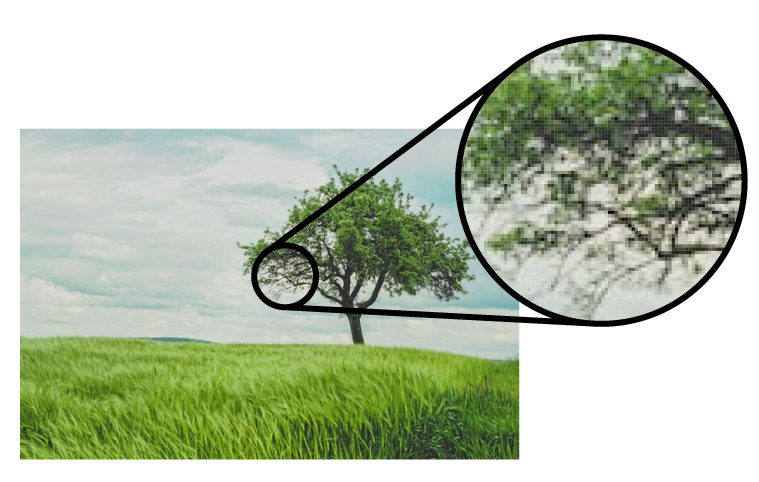
To maintain pixel quality, you cannot resize raster images without compromising their resolution. As a result, it’s important to remember to save raster files in the exact dimensions needed for the application. Bitmap images are ideal for representing photographs and complex scenes with subtle details, such as landscapes or portraits.
Vector images are much more flexible. They are constructed using proportional formulas instead of pixels. Your logo and your brand’s graphics should be created as vectors, and you should always have a master file on hand, trust me, you’ll need it. The true beauty of vectors lies in their ability to be sized as small as a postage stamp or large enough to fit on a truck, all without losing quality.

Image Formats
Now, let’s look at the most important formats you can encounter when handling images.
JPEG (or JPG)
JPEGs (Joint Photographic Experts Group) are the most common file type on the web. JPEGs have “lossy” compression, meaning the image quality decreases as the file size gets smaller, i.e., file weight and quality are directly related.
You can use JPEG for web projects, Microsoft Office documents, or projects that require high-resolution printing. However, pay close attention to the resolution and size of the JPEG files you use, or you’ll end up with a poor result.
There is no difference between the .jpg and .jpeg file name extensions. It’s the same format and will behave the same way.
PNG
PNGs (Portable Network Graphics) are great for interactive environments like web pages but are not the best choice for printing. Although PNGs are “lossless”, meaning you can edit them and not lose quality, they are still low resolution.
The reason PNGs are used in most web projects is that you can save your image with more colors on a transparent background. This results in a much sharper, web-quality image and many more creative possibilities.
WebP
The WebP format is a modern image format developed by Google, intended to provide more efficient image compression for web use. It’s designed to reduce the file size of images without significantly compromising quality, allowing for faster loading times on web pages.
When storing in WebP format, you can choose between lossy or lossless compression. This means images can be compressed without sacrificing any detail or only removing non-crucial information.
Like other formats, WebP supports transparency, making it useful for images with transparent backgrounds, and animations with more efficient compression. Additionally, since it was a format developed by Google, it has been adopted in many of its services and applications, and its use has increased as more browsers and platforms support it.
GIF
GIFs (Graphics Interchange Format) are more common in their animated form, which are very popular in the online world, from memes to banners. In their most basic form, GIFs are made up of up to 256 colors in the RGB color space. Due to the limited number of colors, the file size is drastically reduced.
This is a common file type for web projects where an image needs to load very quickly, rather than one that needs to retain a higher level of quality.
TIFF
A TIFF (Tagged Image File) is a large raster file that does not lose quality. This file type is known for using “lossless compression”, meaning the original image data is maintained no matter how many times you copy, open, resave, or compress the original file.
Despite the ability of TIFF images to recover their quality after manipulation, you should avoid using this file type on the web. As it can take a long time to load, it will seriously affect website performance. TIFF files are also commonly used when saving photographs for printing.
PSD
PSDs (Photoshop Document) are files created and saved in Adobe Photoshop, the most popular graphic editing software of all time. This file type contains “layers” that make image manipulation easier.
Photoshop works with raster images, although it can open vector formats, it will always rasterize them in the process. Another drawback is that these files can only be opened if you have Adobe Photoshop installed on your computer.
This format is perfect for generating and editing images, but the .psd format as such won’t be of much use once you’re done with it; to use the images you’ve created, you’ll need to export them in one of the formats we’ve mentioned.
PDFs (Portable Document Format) were developed by Adobe with the goal of capturing and reviewing information from any application, on any computer, with anyone, anywhere.
For example, if a designer saves your logo created in a vector manner in PDF format, you can view it without any design editing software (as long as you have Acrobat Reader installed), and you’ll be viewing a vector image. They also have the ability to be reopened by the originating program for further manipulations. It is probably the best universal format for sharing graphics.
EPS
EPS (Encapsulated Postscript) is a vector format file designed to produce high-resolution graphics for printing. Almost any design software can create an EPS.
The EPS extension is a type of universal file (like the PDF) that can be used to open vector illustrations in any design editor, not just Adobe products, which are usually the most common. This ensures file transfer to designers who are not yet using Adobe products but may be using Corel Draw or Quark.
SVG
SVG (Scalable Vector Graphics) is a vector format widely used on the web because it is compatible with all modern browsers and can be manipulated with JavaScript and CSS. Like EPS, they are also universal; any type of program can create and open them.
SVGs are ideal for logos, icons, and other graphics on websites and applications because they can adapt to different screen sizes and resolutions without losing quality.
AI
AI (Adobe Illustrator Document) is by far the preferred image format for designers (including myself) and the most reliable file type for using images in all kinds of projects, from web to print, etc.
Adobe Illustrator generates vector images, it is the industry standard for creating illustrations from scratch and, therefore, most likely the program in which your logo was originally created. It can also export to all the file types mentioned above. Not bad at all! It’s one of the best tools in any designer’s arsenal.
CDR
CDR (CorelDRAW) is the native format of CorelDRAW. Like AI, it is useful for complex graphic design work involving multiple layers, detailed illustrations, and custom typography.
INDD
INDD (InDesign Document) are files created and saved in Adobe InDesign. InDesign is commonly used to create larger publications, such as newspapers, magazines, and e-books…
Adobe Photoshop and Illustrator files can be combined in InDesign to produce complex designs featuring advanced typography, embedded graphics, page content, formatting information, and other sophisticated design options.
RAW
A RAW image (from the English raw or unprocessed) is the least processed image type on this list. If set to do so, when you take a photo with your camera, it will be saved in a raw file format, a RAW format.
The RAW format does not compress the photo like JPG does; you will have all the possible quality and information.
When you shoot in RAW format, the camera records all possible values, giving you the ability to change any of these settings (exposure, white balance, shadows, saturation…) later in an editing program, all without losing quality. RAW images are like a kind of “negative,” a fully editable source file from which you can obtain the final image, which will always be a raster image.
Of course, not everything is rosy; having so much quality and information for later editing results in VERY large file sizes, where 400 JPGs might fit, maybe only 100 RAWs will. It is also a format that requires post-production of the image, even if it’s just to save it in JPG format, which can be cumbersome. And finally, it is not a universal format like JPG; there are several types of RAW files, as each camera has its own native format. Here’s a list of camera brands and their respective RAW formats:
- Nikon: NEF
- Canon: CR2
- Sony: SR2
- Pentax: PTX
- Olympus: ORF
- Fujifilm: RAF
- Panasonic: RAW2
To open these types of files, you can use free software like:
- GIMP
- LightZone
- Raw Therapee
- DarkTable
- DigiKam
or paid ones:
- Lightroom
- Capture One
- Camera RAW (Adobe plug-in to work with Photoshop) No, Photoshop alone does not open RAW files.
As you can see, working with images is not as simple as it seems; there’s a lot to it, and we haven’t covered all the existing files, just the most common ones. We hope this article has helped you better understand the main image formats and when to use them.