Ads on ChatGPT: Practical Guide to Creating Your First Campaign in the Ads Manager
 Pablo Díaz · 07 Sep, 2026 · Digital Marketing · 8 min
ChatGPT now has ads in Spain. This novelty arrived on August 24, 2026, in 31 European markets, and since early September, the self-service Ads Manager is also operational here. If you manage advertising accounts, either your own or for clients, now is the time to understand how it works before the channel becomes saturated.
Because it is a very good opportunity for all businesses. We will see why.
In this guide, you will find two things: the theoretical part, to understand what this platform is and how it differs from Google or Meta Ads, and a step-by-step tutorial to create your first campaign.
What is the Ads Manager and why should you try it?
The ChatGPT Ads Manager is OpenAI’s self-service platform to create, manage, and measure advertising campaigns within ChatGPT conversations.
It works similarly to what you already know from Google Ads or Meta Ads: you create an account, set up a pixel, define campaigns and ad groups, and bid to appear.
We will see this in detail a little further down.
You have to keep in mind that not all users see ads. Only those subscribed to the Free and Go plans. If you use Plus plans or higher, your experience remains ad-free.
This is relevant when assessing the real reach of the channel. If your target audience tends to pay for AI tools, your reach on ChatGPT Ads will be more limited than the total number of platform users suggests.
Every now and then, a new advertising platform appears, along with the opportunity to be among the first to enter. It happened with Google Ads in 2003, Meta Ads in 2010, and TikTok Ads in 2020. The first advertisers on each of these platforms achieved results that are much harder to replicate today with established competition.
How do ads work within ChatGPT?
The ad appears below the response generated by ChatGPT, within the same visual field, but always identified and separated from the AI content. It doesn’t mix with the response: the user first sees what ChatGPT answers and, right after, the ad.

Image source: ChatGPT
There are three formats.
- The most common is the brand ad, consisting of the brand name, a headline, and a brief description.
- The second is the carousel, mainly designed for e-commerce, showing several products with their price and estimated delivery time.
- The third, still in testing, is the call to action, with a large image and text in the background.
An important nuance: as an advertiser, you will never know exactly who has seen your ad. All data is shown in aggregate form. There are no user lists or access to anyone’s individual conversations, which also aligns with European data protection regulations.
I’ll talk about this right now.
The big difference with Google and Meta Ads: no segmentation, there’s context
This is where it is most convenient to pause, because it completely changes the way you plan a campaign if you come from Google or Meta Ads.
Context clues
In Google Ads, you segment with keywords. In Meta Ads, with interests, age, or behavior. In ChatGPT Ads, that type of segmentation does not exist. Everything is based on the context of the conversation: what the user is asking, what they have previously discussed with ChatGPT, and what information the system has about your company.
To help the ad reach those who might really be interested, you define what are called context clues. They are not boxes you check, but text in natural language.
For example, instead of selecting “executives, 35-50 years old, interested in technology,” you write something like “entrepreneurs and executives looking to integrate artificial intelligence to optimize their operations, in companies with more than 10 people.” ChatGPT uses that description to decide when to show your ad.
The European nuance
In Spain, and the rest of the European Economic Area, there is one more peculiarity: advertising personalization is not yet available, due to regulations. This means that, here more than in the United States, the weight falls almost entirely on the context of the conversation and how well you have defined your context clues. Taking care of that text is not a minor detail; it is the piece that will most determine if your ad reaches the right audience.
Prohibited topics
For now, OpenAI does not allow ads related to politics, mental health, or health in general. If your business operates in any of these sectors, this channel is not yet an option.
AEO, the preliminary step that determines if your ad will work
Before investing in an ad, there is a question worth asking: what does ChatGPT say about your brand when someone asks about it?
This has a name: AEO, Answer Engine Optimization. It is the equivalent of SEO, but for answer engines instead of traditional search engines. The goal is the same as always, to be found and recommended, only now the one “recommending” is a language model that responds with a phrase, not a list of ten blue results.
If you want to know more about AEO, I recommend you take a look at this article.
And it is not a minor detail: if ChatGPT already recognizes and mentions you organically before your ad appears, the probability of that ad converting increases significantly. It makes sense: the user has already seen your brand mentioned as part of the response they trust, and the ad only reinforces that recommendation.
Advice to do right now. Before launching your first campaign, try this: ask ChatGPT what it knows about your company. If the response is vague, incomplete, or directly does not mention you, working on AEO should be your first step, not the ad.
Step-by-step tutorial: how to create your first campaign in the Ads Manager
Now, let’s move on to the practical part to see how you can set up your first campaign in the ChatGPT Ads Manager.
Register and set up your pixel
The first step is to enter the Ads Manager and register (if you don’t have an account yet).
During this process, you will be asked for information about your company to create the advertiser account.

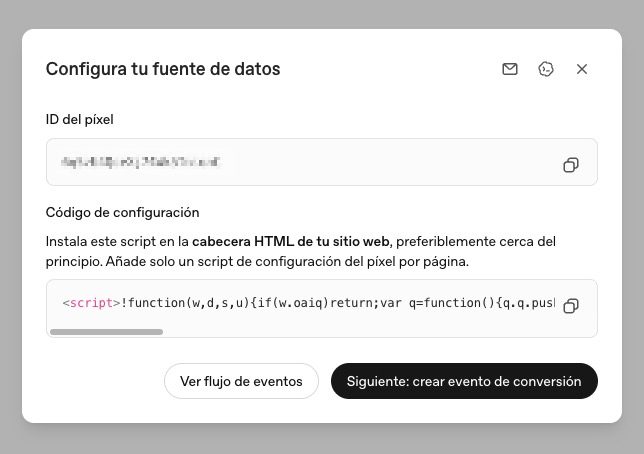
Once inside, the first thing is to set up the tracking pixel. It is the piece of code you install on your website so the platform can track who enters from your ads and if those visits result in the action you seek.
If you have worked with pixels from Meta or Google Ads, the concept will be familiar to you.
To do this, go to the left side “Tools > Conversions”. Then go to the right side and click on “+ Create”. There, “Data source”
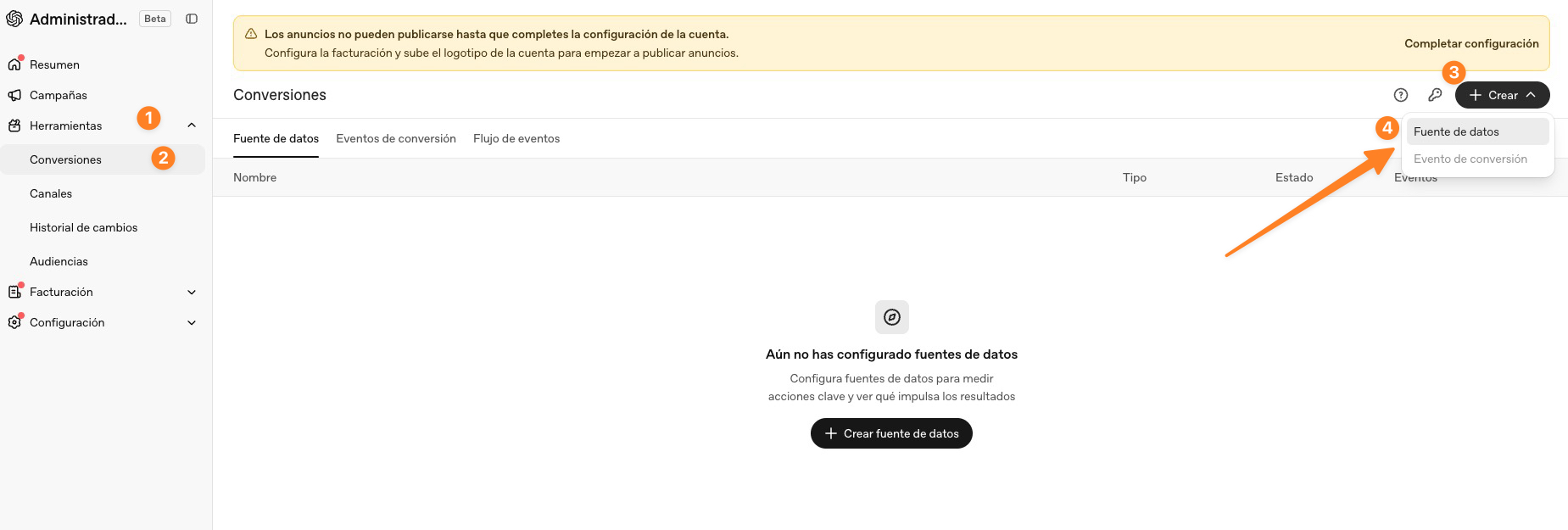
Give it a name, for example, your website, and continue.
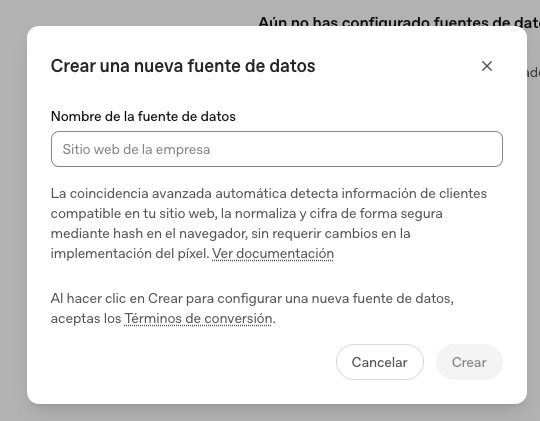
Finally, you will see the code to implement on your website.
Define the conversion event
The conversion event is what tells the pixel if the goal you were seeking has been achieved. It could be someone scheduling a call, completing a purchase, or filling out a form.
This step is crucial: without a well-defined event, you won’t be able to measure if the campaign is working.
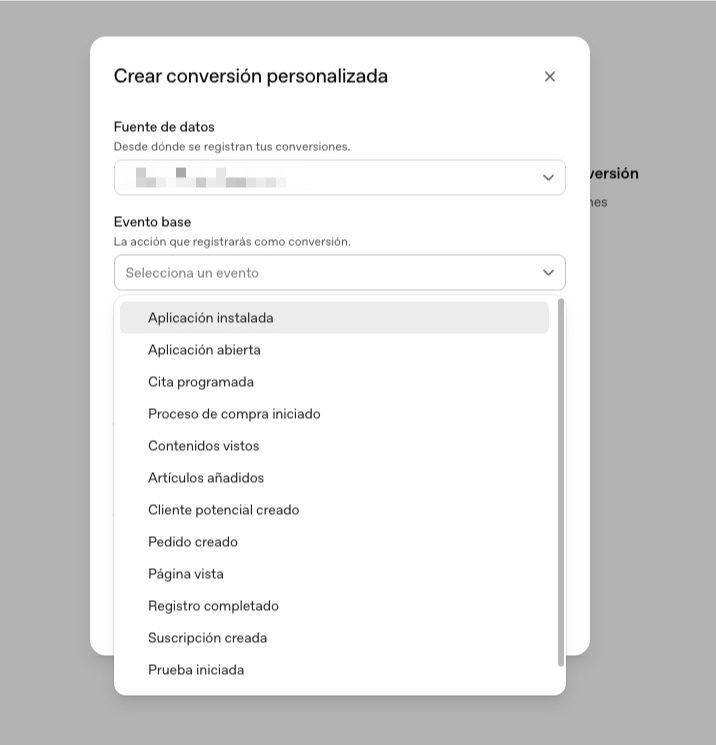
At the time of creating this guide, all those events you see in the image are available.
You should choose the one that best suits the objective you have with the campaign.
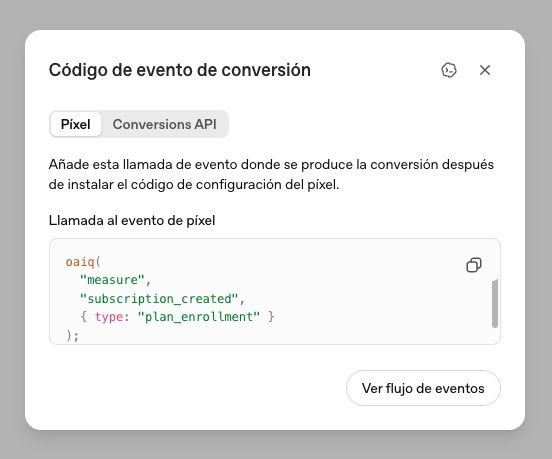
Once created, you will be given another pixel that you must include on the page where the conversion you have chosen occurs.
Create the campaign
With the pixel and event ready, it’s time to create the campaign. To do this, go to the left menu “Campaigns”. From there, go to the right side and click on “+ Create” > “Create campaign”

⚠️ Important. If you completed information about your company in the process, it is likely that the ads manager will propose a default campaign. My recommendation is to click on “Create from scratch”
When you create it from scratch, you define the name (it will be useful to include the month and year to keep track if you launch multiple campaigns), the objective, and the location if you are going to launch several.
The objective can be:
- Reach: if you seek brand awareness
- Clicks: if you want traffic to your website
- Conversions: if you pursue a specific action like a sale or registration.
You can also exclude locations or platforms that do not interest you.

What is the minimum daily budget to invest in ChatGPT Ads?
This is the question you might be asking. For now, they do not allow investing less than €15 / day.
They also allow you to set a budget for the entire campaign.
Let’s continue with the next step.
Set up the ad group
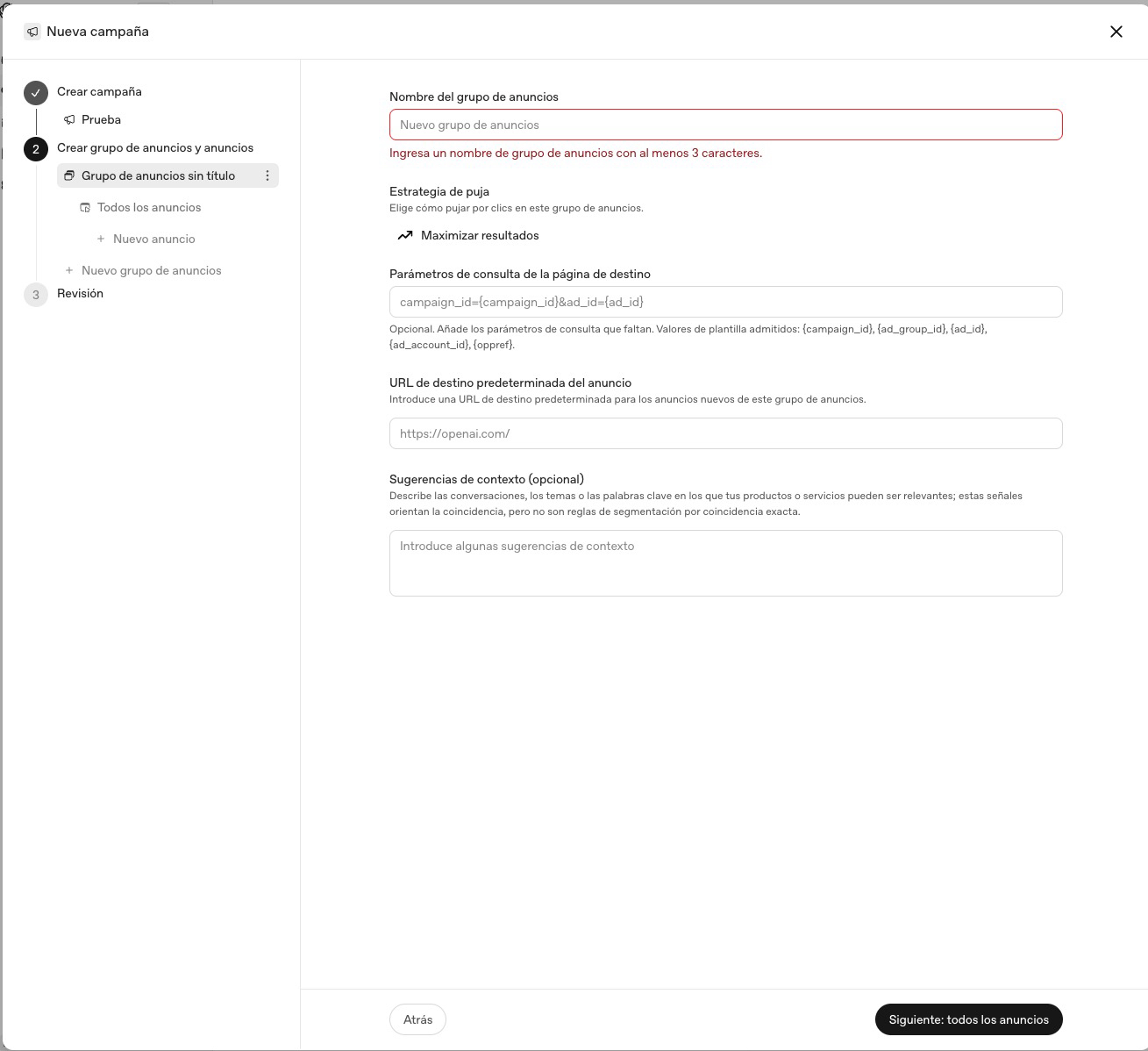
Within each campaign, you can create several ad groups, and it is here where the context clues we have seen before come into play. Describe in detail who you want to reach: their profile, their situation, what they are looking to solve.
Take advantage of this step to add your UTM parameters, so you can identify in your reports what traffic comes from ChatGPT, from which campaign, and from which specific ad.
Design the ad
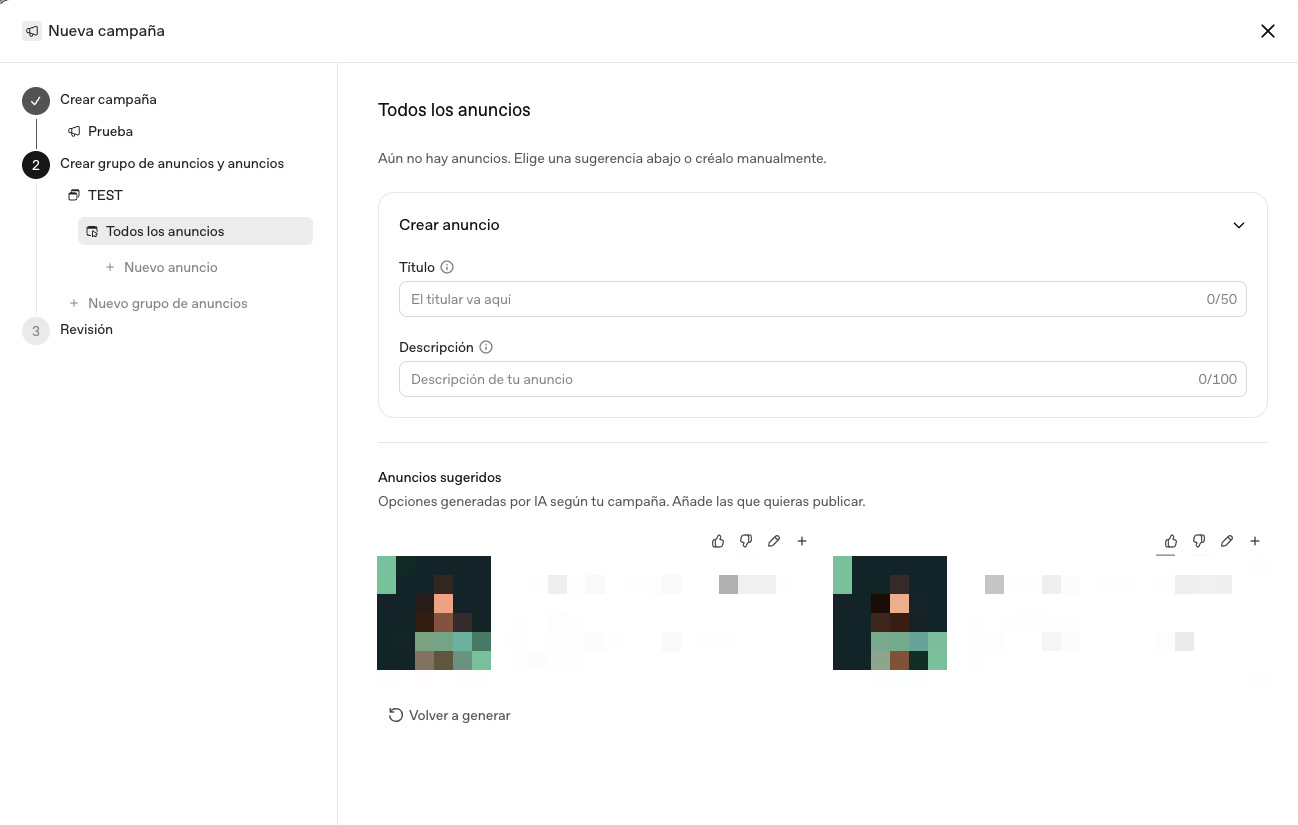
Now it’s time for each ad itself: title, description, and image.
Again, if you have already entered details about your company, it will likely propose some default copies.
The title has room for up to about 50 characters, but from the first 16-23, you risk it being cut off on some mobile devices. The description is similar: up to 100 characters of margin, but the cut can start from 50.
The recommendation is to be very specific. It is not a complete sales argument; it is a brief card of what you offer. For the image, use a square format and something recognizable: your logo or a clear graphic piece.
Before publishing: recommendations
Two tips before launching.
- The first: if it’s your first campaign, start by bidding for CPC instead of CPM. It is a platform still in the learning phase, and the cost per click gives you more control while you understand how it behaves.
- The second: don’t stick with a single ad per group. Create two or three variants, changing the title, image, or some nuance of the message, and let the data tell you which works best.
Use ChatGPT itself to manage your campaigns
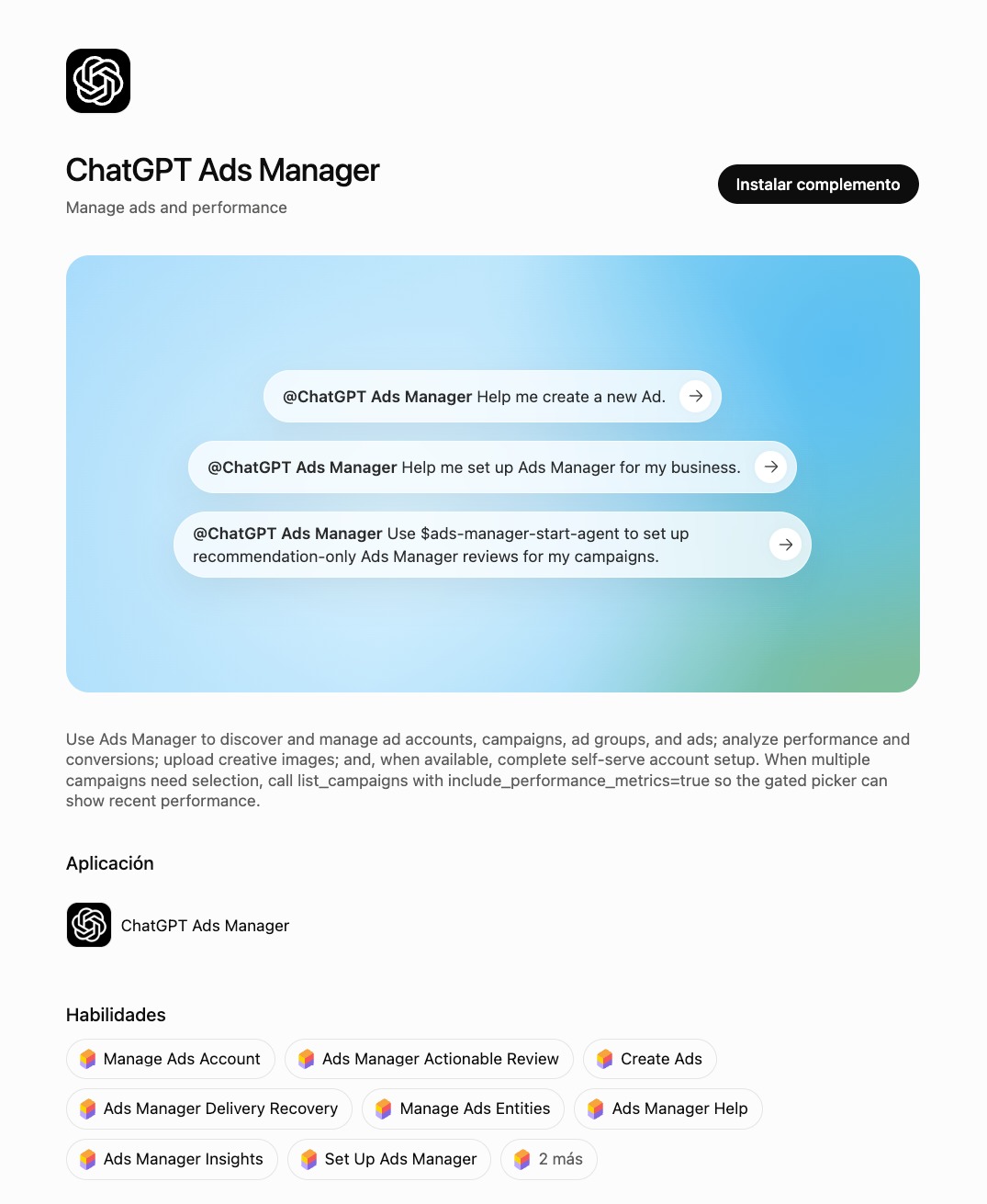
As expected, ChatGPT itself has created a plugin that allows you to consult, edit, and manage all campaigns with a lot of available skills.
It might be useful to go through this process accompanied by AI.
Start familiarizing yourself with a channel that is still being defined
ChatGPT Ads is a channel under construction. Personalization is limited by European regulations, and the reporting is, for now, more basic than that of platforms with more experience like Google or Meta Ads. This is typical of any new advertising channel: first, you learn to use it, then control and data come.
Those who take the time to understand it from the beginning, when there are fewer advertisers competing for the same space, usually start with an advantage over those who wait for the channel to mature and become saturated.
Meanwhile, there is a channel where segmentation and data have always been completely in your hands: email. With Acumbamail, you can build that direct relationship with your audience, with a level of control that a new channel like ChatGPT Ads cannot yet offer you.